Skip to content

Bundles

v1.12.0 Running in production WooCommerce 8.0 PHP 7.4

WooCommerce bundles plugin: mix-and-match product bundles plus buy-more-save-more quantity discounts (2 for -10%, 3 for -15%, your tiers) and BOGO offers such as buy 1 get 1 free. Colour and size choice per item, free gift on any tier, and no coupons — discounts apply automatically in the cart.

Live demo
Shop
Prices
Design
Heading
Colour

Bundle & save

+ FREE 250 g sample bag!

This is the real widget on sample products — nothing is added to a cart. You set the tiers, discounts, labels, colours and design under WooCommerce → Bundles. Products with colours and sizes get a choice per item.

Choose your plan

Prices shown per month, billed once a year. Renew manually with a discount — never auto-charged. Pay once and keep it. No subscription, no renewal, no auto-charge.
  • 1 year of updates in wp-admin
  • Lifetime updates in wp-admin
  • 1 year of developer support
  • Lifetime developer support
  • Instant licence key & download
MONEY-BACK GUARANTEE 30 DAYS
30-day money-back guarantee

If it does not work for your store, you get a full refund within 30 days. Lifetime licences too. Refund policy

Secure checkout · Invoice with every order · GPL code
Bundles
FAQ

Questions about Bundles

Something not covered here? Pre-sale questions are answered by the developer — we aim to reply within one business day.

Ask a question
What is the difference between the two modes?

“Mix and match” counts the combined quantity of any products in a group together — pick any 3 items, any mix, and reach the 3-item tier. “Same product” gives each product its own ladder, the classic buy 2 save 10% table.

How is the discount applied?

As its own “Bundle discount” line in the cart, recalculated from what is actually in the cart on every refresh — no coupon, and it works however the items got there.

Does it work with variable products?

Yes. In Mix and match every item gets its own colour and size choice with out-of-stock combinations disabled, and a group can hold specific variations or a whole variable product.

Can I make it match my theme?

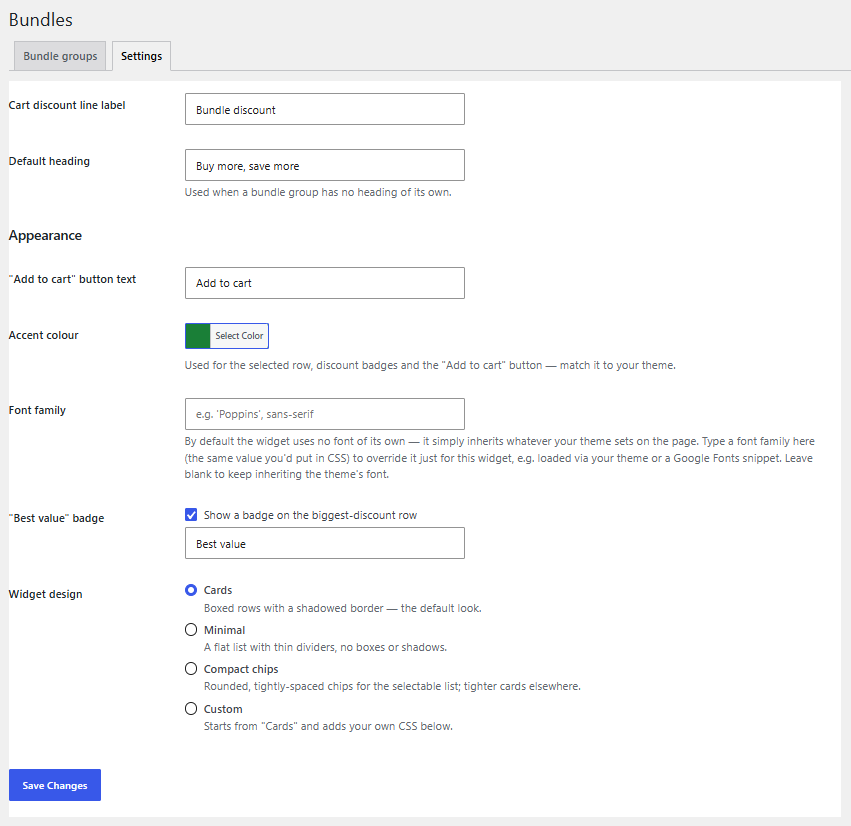
Yes. Button text, accent colour, the “Best value” ribbon, heading style and the picker’s corner radius, padding and shadow are all settings under WooCommerce → Bundles → Settings — no code needed.

Can I add a free gift to a tier?

Yes. Each tier can show a gift text and add a gift product to the cart at 0 once the customer reaches the quantity — and remove it again if they drop below.

What happens after the first year?

The plugin keeps working exactly as before — we never disable anything remotely. Updates and support pause until you renew. We e-mail you 30 and 7 days ahead with a renewal link at 30% off, and nothing is ever charged automatically. Or choose Lifetime and never renew.

Can I pay once instead of every year?

Yes. Pick Lifetime above: one payment of 2.5× the yearly price, no renewals, and updates and support for as long as the plugin is maintained. Compared with renewing yearly, it becomes the cheaper option from year 4.

Is there a money-back guarantee?

Yes — 30 days. If the plugin does not work for your store, we refund the full amount, as long as the licence has been activated on no more than one production site. It covers Lifetime licences too. Details are in the refund policy.

Do staging and local sites use up a licence slot?

No. Sites on localhost, *.local, *.test and subdomains named staging or dev do not count. A licence moves between sites any time: deactivate the old one under My Account → Licences, then activate the new one.

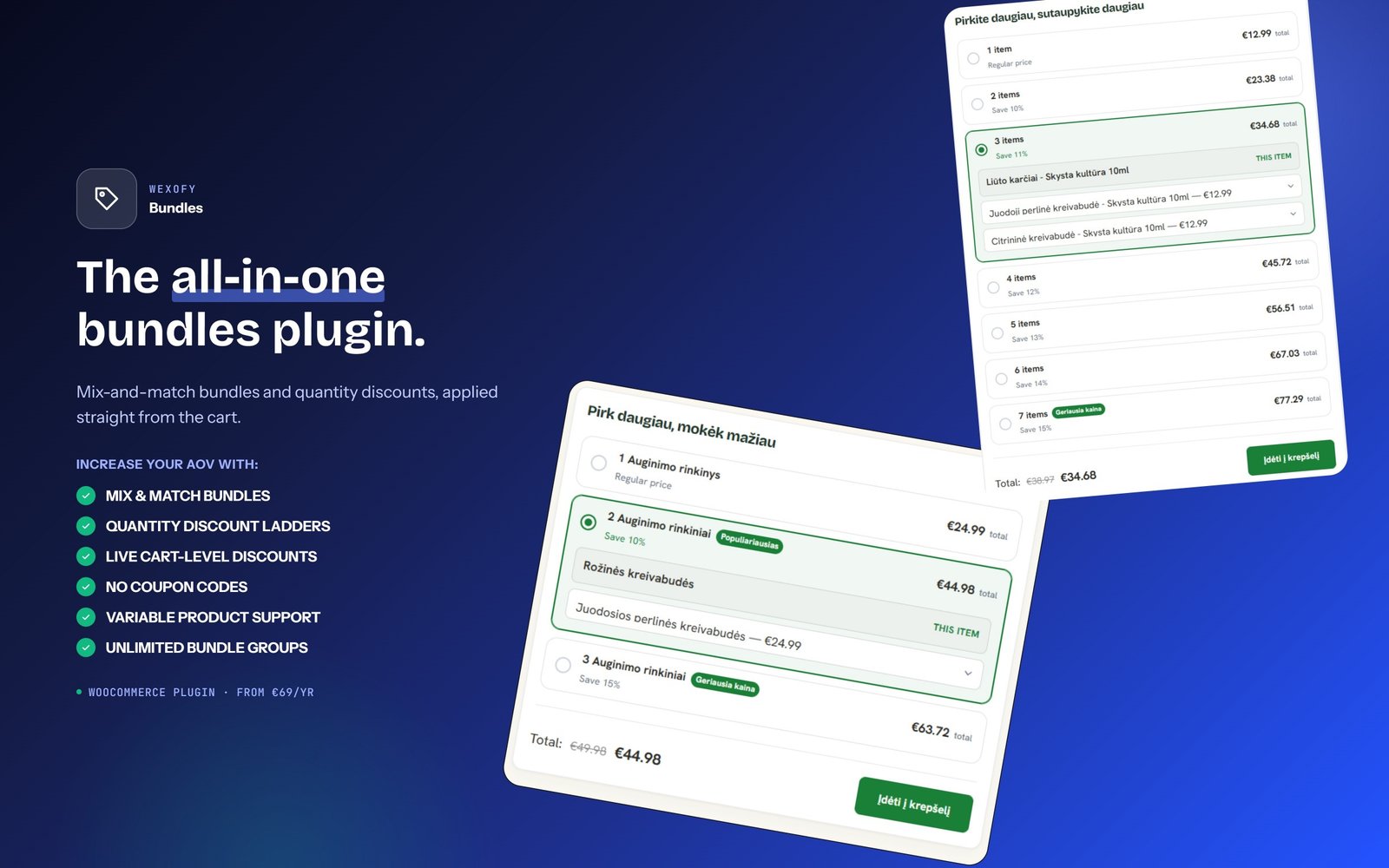
A WooCommerce bundle plugin that does both mix-and-match bundles and quantity discounts, to increase average order value. The discount is always calculated from what is in the cart — no coupon codes.

Mix-and-match bundles

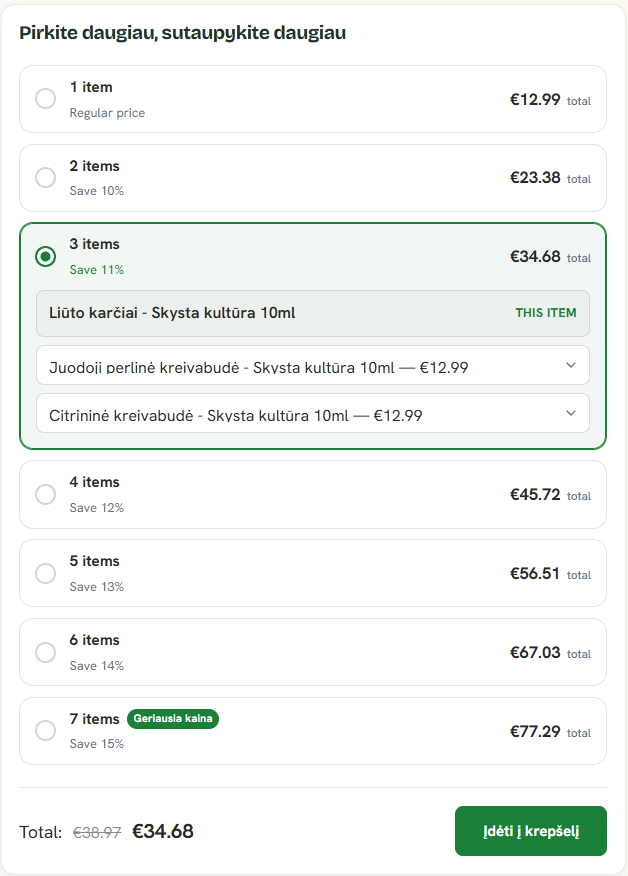
Group products by hand or by category and give the group a shared discount ladder. Customers pick any items, see a live total, and unlock the discount as the quantity grows.

Quantity discounts: buy more, save more

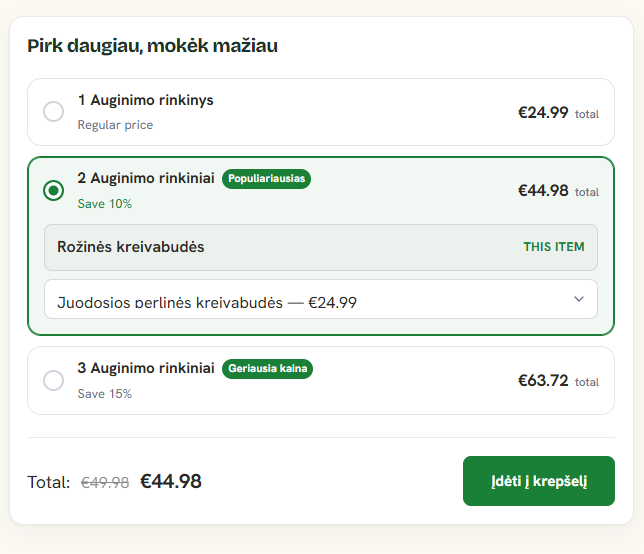
1 unit at full price, 2 at -10%, 3 at -15% — set your own tiers as a percentage or a fixed amount off, shown as a pricing table on the product page.

BOGO offers: buy one, get one

Buy 1 get 1 free, buy 2 get 1 at 50% off, buy 2 get 2 free. The cheapest items are the discounted ones and the offer repeats, so 4 items on a buy-1-get-1 tier means 2 free. Still one cart line, no coupon.

Colour and size per item

Each bundle item has its own colour and size choice, as swatches or dropdowns. Sold-out variations are disabled.

Free gift on any tier

Show a reward such as + FREE sticker pack and optionally add a real gift product to the cart at 0 when the customer reaches the tier.

Fits your store design

Plain, divider or banner heading, card, minimal or chip layouts, accent colour and custom styling — with as many bundle groups as you need.

Features

Mix and match bundles

Pick any products from a group; the combined quantity unlocks the tier.

Quantity discount ladder

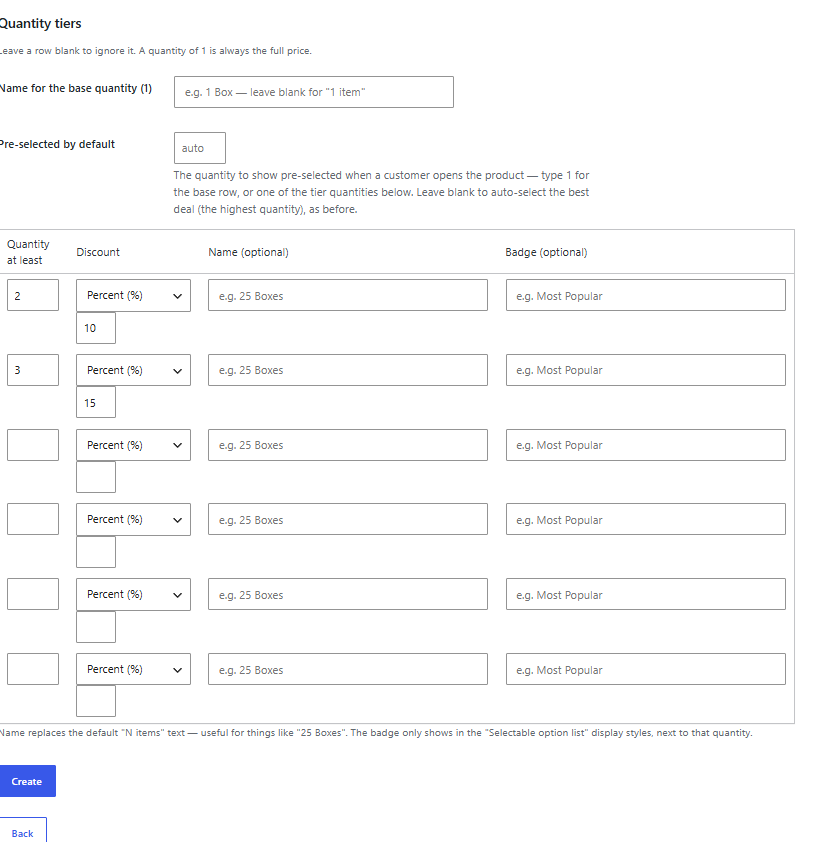
1 = full price, 2 = -10%, 3 = -15% — tiers and percentages are yours to set.

No coupon needed

Discounts are a live cart line, recalculated from actual cart contents every time.

Works however items get added

The widget is a convenience — the discount applies to the cart regardless of the path.

Colour and size per item

T-shirt in 3 colours and 5 sizes? Every item in the bundle picks its own, with sold-out combinations disabled.

Free gift on a tier

A highlighted + FREE strip and, optionally, a real gift product added to the cart at 0.

Your headline, your look

Plain, divider or banner heading in your own words and size, plus cards / minimal / chips and full custom styling.

As many groups as you like

Different products, tiers and headings per bundle group.

BOGO offers

Buy 1 get 1 free, buy 2 get 1 at 50% off. The cheapest items get the discount and the offer repeats.

What it looks like

Click any screenshot to view it full size.

—
No reviews yet

Reviews here come from real buyers only

We don’t publish made-up ratings. Once customers have used this plugin in their shop, their reviews — with a “Verified buyer” mark — appear here.

Used in our own store Runs on the product pages of fungusas.lt. A real LiteSpeed Cache problem we hit there is the reason the widget now ships its own CSS and JS inline.

Bought this plugin? Log in to leave a review.

Ask a question first

Reviews

There are no reviews yet.

Only logged in customers who have purchased this product may leave a review.

Requirements

Standard WooCommerce install. Works with HPOS (High-Performance Order Storage) on or off, classic and block themes.
WordPress6.2
WooCommerce8.0
PHP7.4
WooCommerce tested up to9.9
Plugin slugwx-bundles

Changelog

v1.12.0
  • New: BOGO offers. A tier can now be a *Buy X, get Y* offer instead of a percentage or fixed amount: Buy 1 get 1 free, Buy 2 get 1 at 50% off, Buy 2 get 2 free. Choose the *BOGO* discount type on a tier, set how many items to buy and how many get the discount (and the percentage off, blank = free). The cheapest items in the set are the discounted ones and the offer repeats (with Buy 1 get 1 free, 4 items in the cart means 2 free). Works in Mix and match groups and in Same product groups, shows as a clear label on each row, and is still a single "Bundle discount" cart line with no coupon.
v1.11.0
  • New: free gift per tier. Each tier can carry a gift text (shown as a highlighted strip under that quantity, e.g. "+ FREE 50pcs sticker pack!") and optionally a gift product that is added to the cart automatically at 0 once the customer reaches the quantity and removed again if they drop below it. Gift lines are fixed at quantity 1, cannot be removed by hand, and never count toward a discount. A tier can have a gift without a discount.
v1.10.0
  • New: Settings > Appearance > Heading style - Plain, Divider ("---- BUNDLE & SAVE ----") or Banner (the divider on a coloured strip, with your own banner colour), plus a Text size slider (12-36 px). New installs start with the Divider style and the heading "Bundle & save". The wording is still the group's Heading field (or the Default heading), so you can write whatever you like.
v1.9.0
  • New: variable products (T-shirt in 3 colours x 5 sizes) now work in "Mix and match" groups - every item in the bundle gets its own colour and size choice, out-of-stock combinations are disabled, and the chosen variations go into the cart with the discount applied as before. Settings > Appearance > Colour / size picker: "Swatches and buttons" or "Compact dropdowns".
  • Fix: after switching to another row (e.g. from 3 items to 2 items) the first item of that row was not submitted, so the product being viewed could be missing from the cart.
v1.8.0
  • New: the "Custom" widget design now has its own controls under Settings > Appearance > Custom design - corner radius, padding, space between rows, border width and shadow - so you can tune the look (and compare what converts best) without writing CSS. Custom CSS still works on top.
v1.7.0
  • Removed: the "native Add to cart" display style for "Same product" groups, and the "Above the Add to cart button" position — the theme's own button often kept showing alongside it instead of behaving as intended. Existing groups using either setting fall back to the "Informational table" style and "After the Add to cart button" position. The "Selectable list, own Add to cart" style (with the "Hide the theme's own quantity field and Add to cart button" option) covers the same use case reliably.
v1.6.1
  • Fix: the "Compact chips" design distorted a "Mix and match" row into a lopsided capsule once it expanded to show its product slots — the full pill shape (border-radius: 999px) is now only used on the "Same product" selectable list, which has no expanding content; the builder gets a modest rounded corner instead.
  • New: "Font family" field under Settings → Appearance — the widget inherits your theme's font by default (it sets none of its own), type a font-family value here to override it just for the widget.
v1.6.0
  • Fix: a tier's custom "Badge" text wasn't showing in the "Mix and match" builder — it only ever reached the "Same product" selectable list. Both now show it (falling back to the "Best value" ribbon when a row has no custom badge of its own).
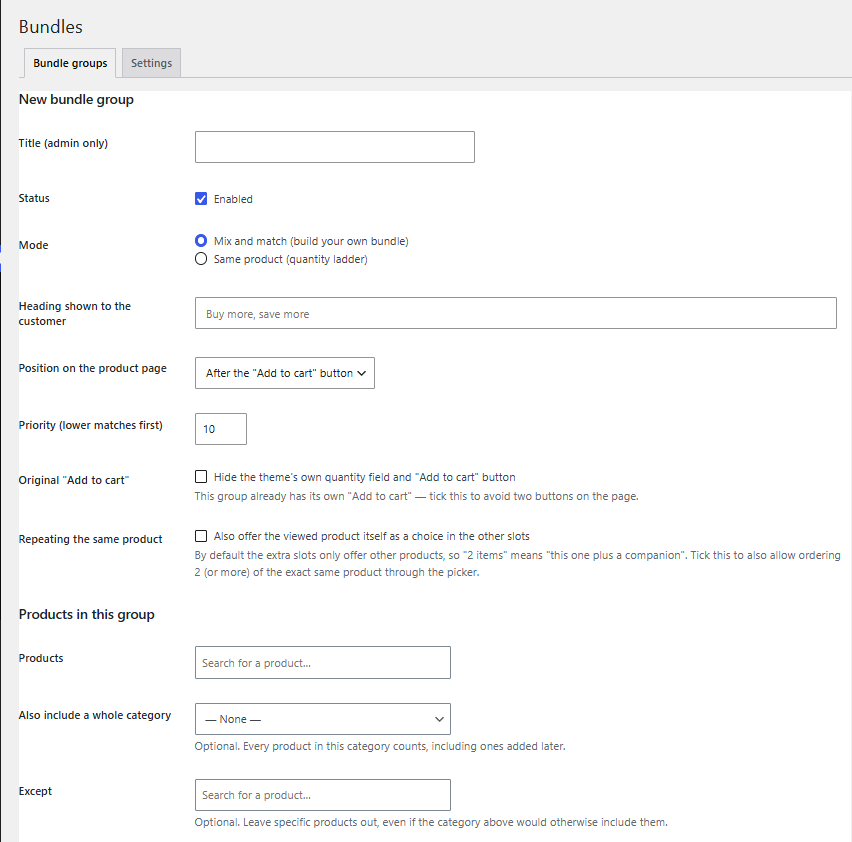
  • New: "Repeating the same product" option for "Mix and match" groups — lets the viewed product also be picked in the other slots, for ordering N of the exact same product through the picker (off by default, to keep the existing "this one plus a companion" behaviour).
  • Added INSTALL.txt — a plain-English, step-by-step install guide for a first-time user.
v1.5.0
  • New: three built-in widget designs — Cards (default), Minimal (flat list, no boxes) and Compact chips — plus a Custom option with a Custom CSS field, all under Settings → Appearance → Widget design.
  • New: "Pre-selected by default" field per group — choose which quantity starts selected instead of always the best deal.
  • New: "Name" field per quantity tier (and for the base "1 item" row) — replace the auto-generated "N items" text with your own, e.g. "25 Boxes".
v1.4.0
  • New: "Except" field under "Also include a whole category" — pick specific products to leave out even though the category would otherwise include them.
v1.3.1
  • Improved: the bundle group form now only shows the "Display style" and "Original Add to cart" fields when they're actually relevant to the chosen mode/style, and shortened their labels.
v1.3.0
  • New: "Hide the theme's own quantity field and Add to cart button" option per group, for the "Mix and match" builder and the "Same product" selectable option list — both already provide their own "Add to cart", so the theme's copy can now be hidden to avoid two competing buttons on the page.
v1.2.1
  • Fix: a bundle group's widget could print twice on the same product page when any other enabled group elsewhere on the site used a different display position — each group now only renders at its own configured position.
v1.2.0
  • New: a third "Same product" display style — a selectable list that uses your theme's own "Add to cart" button instead of a separate one, hiding the normal quantity field and setting it automatically from the chosen row. Pair it with the new "Above the Add to cart button" position.
v1.1.0
  • New: "Same product" groups can now show a selectable option list instead of the informational table — radio rows with per-unit price, a struck-through regular price, and an "Add to cart" of their own.
  • New: optional custom badge text per tier (e.g. "Most Popular", "Best Shipping Value"), shown in the new selectable list.
Select your currency
EUR Euro
Bundles from €69.00 / year
Choose plan