Complete Bundle
Every paid plugin we make, one licence key, well below the sum of the parts.
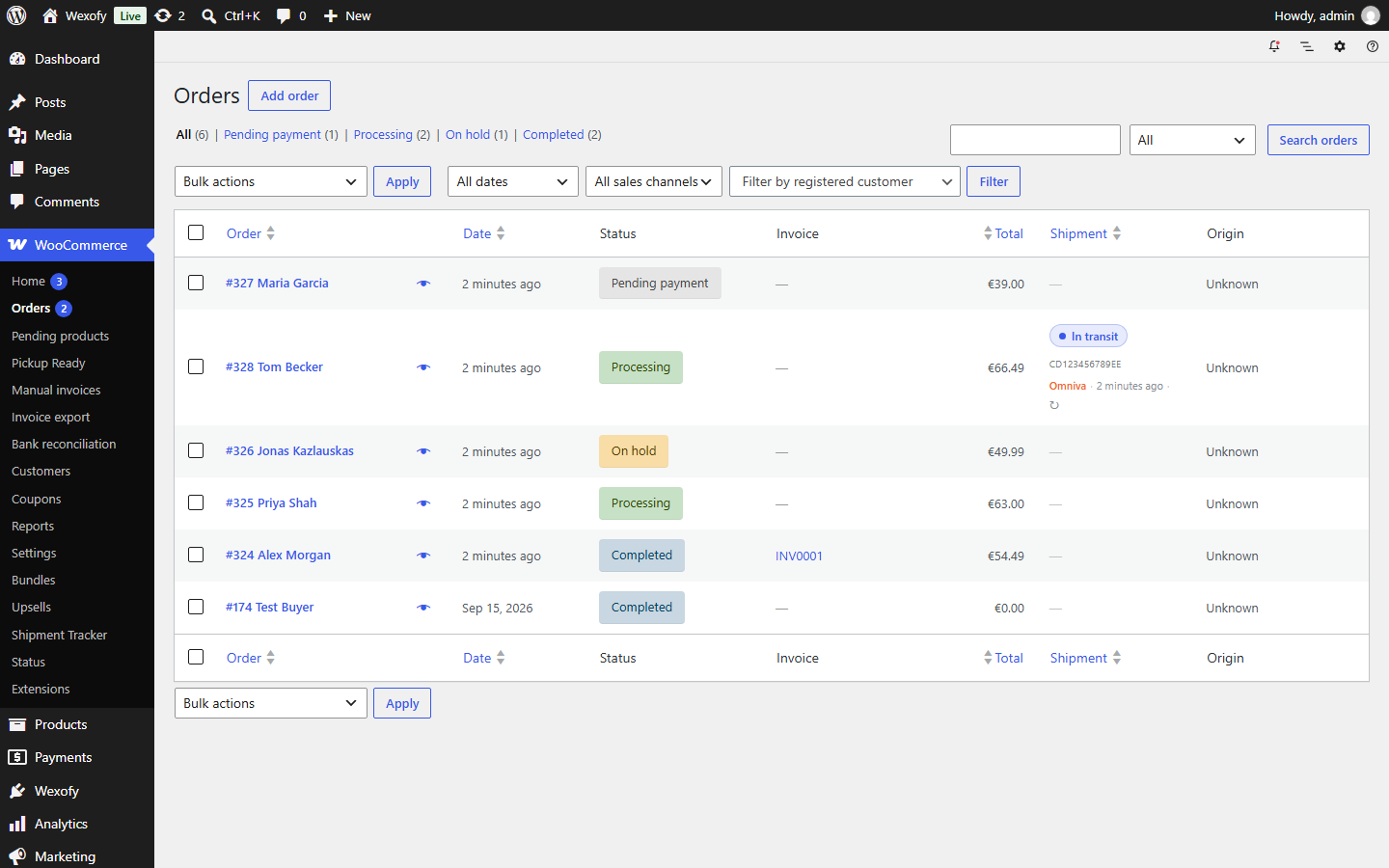
Live delivery status for every WooCommerce order, from 65+ carriers worldwide. A colour-coded Shipment column shows at a glance what is still at the warehouse, what is in transit, what is waiting at a pickup point and what is delivered.
Wexofy Shipment Tracker for WooCommerce — no licence needed. Install it under Plugins → Add New → Upload, or straight from the Wexofy Hub. Upgrade to Pro any time.
If it does not work for your store, you get a full refund within 30 days. Lifetime licences too. Refund policy
Six normalised statuses, refreshed from the courier. Press ↻ to simulate a check and watch the parcels move; switch to the customer view to see what your buyers get.
| Order | Carrier | Tracking | Shipment status |
|---|
Diagnostics
Simulated parcels — no courier is contacted. On your store the same statuses come from the courier’s tracking API.
Once a parcel leaves, WooCommerce stops telling you anything useful about the order. Shipment Tracker closes that gap: it finds the carrier and tracking number of every order, checks the delivery status in the background and shows one of six clear statuses right in the Orders list – and to your customers.
The free Wexofy Shipment Tracker for WooCommerce plugin detects the carrier of each order from 65+ carriers worldwide – DHL, UPS, FedEx, USPS, DPD, GLS, PostNL, PostNord, Royal Mail, Evri, Colissimo, InPost, Packeta, Canada Post, Australia Post and more – adds a Shipment column with the tracking link, a tracking box on the order screen, and sends the link to customers on the order page and in e-mails.
Connect AfterShip, TrackingMore or 17TRACK once – one key covers every carrier and recognises it from the number. Pro checks open shipments on a schedule you set, stops at delivered or returned, adds an order note on every change, lets you filter and sort orders by status, and shows customers the status and delivery history in My Account and in e-mails.
Every status change fires do_action( 'wxstp_status_changed', $order, $new, $old, $carrier ) – use it to e-mail or SMS customers, or to auto-complete orders on delivery.
The settings show the last check, the last error and a test button for your tracking service, so a wrong key or a rate limit is obvious straight away.
The free version, Wexofy Shipment Tracker for WooCommerce, is complete on its own. Pro adds more ways to sell and keeps every free feature.
| Feature | Free€0 · no licence | Profrom €49 / year |
|---|---|---|
| Tracking numbers | ||
| 65+ carriers with working tracking links | Included | Included |
| Carrier found automatically | Included | Included |
| Shipment column in the Orders list | Included | Included |
| Tracking link on the order page and in e-mails | Included | Included |
| Your own carriers | Included | Included |
| Live status | ||
| Delivery status: in transit, at pickup point, delivered | Not included | Included |
| AfterShip, TrackingMore or 17TRACK (one key for every carrier) | Not included | Included |
| Direct Omniva and Venipak tracking | Not included | Included |
| Background refresh | Not included | Included |
| Filter and sort orders by status | Not included | Included |
| Status in My Account and e-mails | Not included | Included |
| Download free | Get Pro | |
Colour-coded in the Orders list, so a glance is enough.
DHL, UPS, FedEx, USPS, DPD, GLS, PostNL, Royal Mail and more, detected automatically.
AfterShip, TrackingMore or 17TRACK recognise the carrier from the number.
Checks on a schedule you set, and once more 90 seconds after an order changes status.
Shipping method, the order tracking box, or Advanced Shipment Tracking — no double entry.
Every change is logged on the order and exposed as an action for e-mail, SMS or auto-complete flows.
Status and delivery history in My Account and in order e-mails.
Works with High-Performance Order Storage on or off.
Click any screenshot to view it full size.
We don’t publish made-up ratings. Once customers have used this plugin in their shop, their reviews — with a “Verified buyer” mark — appear here.
Used in our own store Shows the delivery status of every parcel in the orders list of fungusas.lt and refreshes it automatically.
Bought this plugin? Log in to leave a review.
Ask a question firstOnly logged in customers who have purchased this product may leave a review.
Standard WooCommerce install. Works with HPOS (High-Performance Order Storage) on or off, classic and block themes.
Something not covered here? Pre-sale questions are answered by the developer — we aim to reply within one business day.
Ask a questionA built-in database of 65+ carriers worldwide — DHL, UPS, FedEx, USPS, DPD, GLS, PostNL, PostNord, Royal Mail, Evri, Colissimo, InPost, Canada Post and more. Tracking links work with no configuration. The carrier is detected from the order’s shipping method, from a shipment-tracking plugin, or from the tracking panel on the order.
Pick a tracking service — AfterShip, TrackingMore or 17TRACK — and paste its key; one key covers every carrier. Live status is part of Pro; the free version still shows the tracking number and link in the Orders list and to customers.
Yes — on the order-received page, in My Account and in the order e-mails.
Add it yourself under WooCommerce → Shipment Tracker → Add a carrier: a name, the tracking URL with {number}, and the words that appear in your shipping method.
The plugin keeps working exactly as before — we never disable anything remotely. Updates and support pause until you renew. We e-mail you 30 and 7 days ahead with a renewal link at 30% off, and nothing is ever charged automatically. Or choose Lifetime and never renew.
Yes. Pick Lifetime above: one payment of 2.5× the yearly price, no renewals, and updates and support for as long as the plugin is maintained. Compared with renewing yearly, it becomes the cheaper option from year 4.
Yes — 30 days. If the plugin does not work for your store, we refund the full amount, as long as the licence has been activated on no more than one production site. It covers Lifetime licences too. Details are in the refund policy.
No. Sites on localhost, *.local, *.test and subdomains named staging or dev do not count. A licence moves between sites any time: deactivate the old one under My Account → Licences, then activate the new one.
Reviews
There are no reviews yet.