WooCommerce 11.2: Breaking Changes to Check Before You Update
WooCommerce 11.2 ships today. Breaking changes to date filters, Blocks checkout layout, Store API status codes, and abandoned cart recovery need checking before you update.
WooCommerce 11.2.0 shipped today, October 6, 2026, and it is a release worth pausing on before you hit update. The headline features (GTIN-based product importing, configurable order withdrawal emails, and richer Block styling) are practical additions. The release also contains several breaking changes to date handling, Blocks checkout layout, and the Store API that can silently alter how your store behaves without triggering an obvious error.
What changed in WooCommerce 11.2
The three headlining additions in the pre-release notes are:
- GTIN-based CSV product importing. When “Update existing products” is enabled, the importer now matches rows by GTIN, UPC, EAN, or ISBN when no row ID or SKU is present. Match order is ID, then SKU, then Global Unique ID. Rows with a non-blank identifier that matches nothing are now skipped rather than creating duplicates. Cleanup removes only temporary placeholder products created by that specific import, not site-wide orphan products.
- Configurable order withdrawal emails. WooCommerce now ships configurable email notifications for order withdrawal requests, accessible via WooCommerce > Settings > Emails. You can edit recipients, subject, additional content, toggle each notification on or off, and preview before saving. This builds on the right-to-withdrawal feature introduced in 11.1.0 and applies directly to any store selling to EU consumers.
- Richer Block styling. Product Image blocks gain border controls. Product Quantity blocks add border, box shadow, border radius, and text/background colour. Product Filters can now stick to the viewport. Chips blocks pick up typography, padding, and border radius, all through the normal editor panel.
A smaller but useful addition for developers: the Additional Checkout Fields API now supports a date field type, letting extensions collect birthdays, preferred delivery dates, or similar data. Limits can be set as fixed dates or relative periods (for example, tomorrow through 30 days out). The browser’s native date picker handles the UI on mobile.
The WooCommerce 11.2 breaking changes that need your attention
Those same pre-release notes list several changes that will alter existing behaviour without raising a visible error on the front end.
Date filters now use store timezone, not UTC
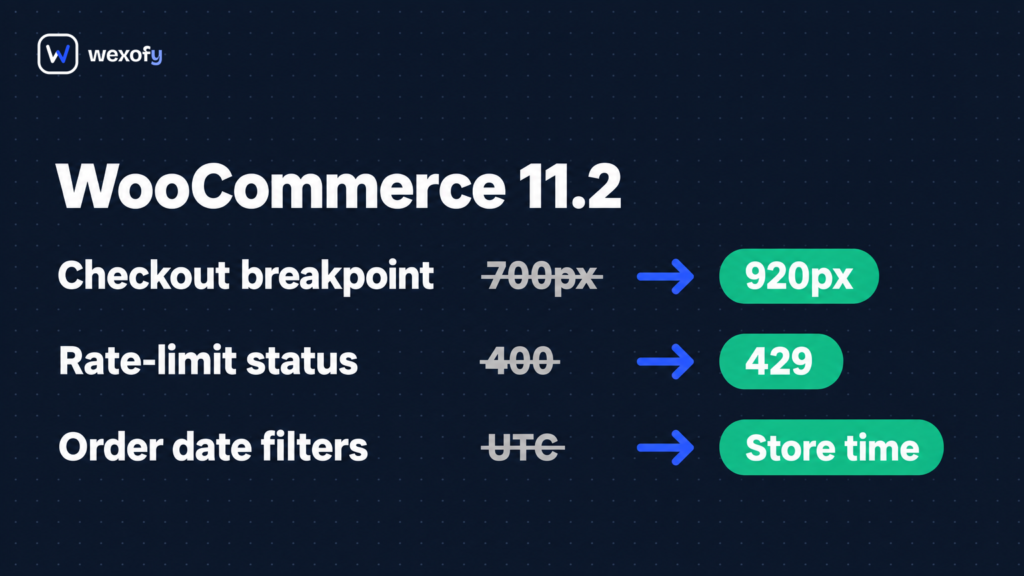
wc_get_orders() and wc_get_products() now interpret date parameters in the store’s configured timezone instead of UTC. If any custom code, plugin, or automation passes a date argument to those functions (pulling the last 24 hours of orders, generating a daily sales report, filtering products by creation date), the results will shift by however many hours your store is offset from UTC. For a store set to UTC+3, that is a three-hour window of orders or products that will appear in the wrong bucket. Audit every date argument you pass to those functions and decide whether you need to compensate for the offset.
Blocks checkout layout changes
If your store uses the Cart or Checkout blocks rather than the classic [woocommerce_checkout] shortcode, two layout values have changed: the order summary column is now fixed at 360px (previously 35% of the container), and the two-column breakpoint moves from 700px to 920px container width. On a 900px-wide container, the layout will now stack where it did not before. Test at 800px and 900px widths before pushing to production. Checkout layout shifts are easy to miss, and our post on checkout details that cost conversions covers more of what to watch in this area.
Store API status codes change
Two API response changes affect any code or integration that inspects HTTP status codes from the Store API. Rate-limited requests now return HTTP 429 instead of 400. A failure loading the cart session now returns HTTP 500 with no Cart-Token or Cart-Hash header, rather than a partial response. Any integration (a headless frontend, a custom mobile app, a third-party cart tool) that checks for a 400 to detect rate limiting or expects a token on every cart response will need updating.
Experimental abandoned cart recovery is removed
WooCommerce’s opt-in experimental abandoned cart recovery feature is fully removed in 11.2.0. The database migration cancels all queued actions and drops the wc_email_unsubscribes table. If your store was enrolled in that experiment, upgrading will remove the queued data. Stores using a standalone plugin for abandoned-cart follow-up are not affected; Wexofy Flows runs its own abandoned-cart email system independently of the built-in experiment. That said, confirm which tool is actually handling your recovery emails before you upgrade, so nothing goes quiet without you noticing.
Other changes worth noting
- The Admin Order Editor no longer accepts negative line item quantities. If any workflow (manual adjustments, refund flows, or custom admin tooling) relies on entering a negative quantity, those workflows will need rethinking.
- Category display types are now normalized through
sanitize_key(): a custom type stored asCustom_Gridbecomescustom_grid. Any code that checks for the original capitalised version will stop matching. - PhotoSwipe’s
%url%placeholder in custom error messages is no longer replaced with the failed image URL; it appears literally. If you customised that message, review it.
What to do before you update
- Test on staging first. WooCommerce 11.2.0 ships eight database migration functions covering analytics cache, tax lookup tables, refund markers, stock notification settings, variation images, and the abandoned cart removal. Run the upgrade on a staging copy before touching production.
- Search your codebase for
wc_get_ordersandwc_get_productscalls that pass a date argument. Check whether the new timezone interpretation changes your results. A quick test on staging: does your “today’s orders” count match what you expect after upgrading? - Check Blocks checkout at 800px and 900px widths. The two-column breakpoint now sits at 920px. If you are on the classic shortcode checkout, this does not apply to you.
- Review integrations that read Store API HTTP status codes. Update any code that treats a 400 as a rate-limit signal, or that expects a
Cart-Tokenon every cart response. - Confirm your abandoned-cart recovery setup. If you were enrolled in WooCommerce’s built-in experiment, decide now whether to migrate to a standalone plugin before upgrading.
- Check custom category display types. If your theme or a plugin registers a display type with uppercase letters or special characters, find those strings and update them to the sanitized equivalent.