WordPress 7.1.3 Security Update: What WooCommerce Stores Must Do
WordPress 7.1.3 shipped October 6 with seven security fixes. Here's which vulnerabilities matter for WooCommerce stores and the steps to take.
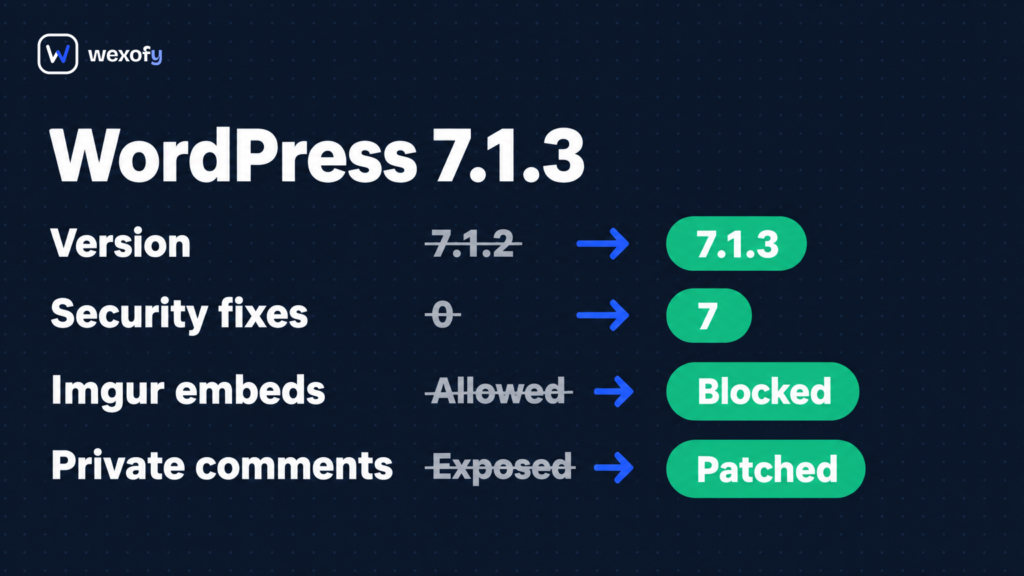
The WordPress 7.1.3 security update shipped on October 6, 2026 with seven security fixes, and every WooCommerce store is affected: the platform runs on WordPress. Two of the patches close XSS vectors reachable by contributor-level accounts, one fixes a second-order SQL injection in the export tool, and one lets unauthenticated visitors read comments on private posts. WordPress recommends updating immediately.
What Changed in WordPress 7.1.3
The release, dated October 6, 2026, patches seven security vulnerabilities and four bugs. Researchers from Trail of Bits, Patchstack, and Anthropic reported the majority of the findings.
- Stored XSS on the comments admin page. A pending comment can carry a script payload that fires when an administrator opens the Comments screen. Reported by Thomas Chauchefoin of Trail of Bits.
- Denial of service in WP_Http::make_absolute_url(). A Contributor-or-higher account can trigger the HTTP method to crash. Reported by Anthropic.
- Second-order SQL injection in WXR export. Malicious values already in the database can execute SQL when an administrator runs Tools → Export. Reported by Anthropic.
- Author-role sticky post escalation. Author accounts can mark any post as sticky, a capability normally reserved for Editors and above. Reported by Anthropic.
- Unauthenticated disclosure of private post comments. Visitors who are not logged in can read comments on private or unpublished posts through a public REST API endpoint. Reported by Ananda Dhakal of Patchstack.
- XSS via Imgur embeds. A Contributor-or-higher user embedding an Imgur URL can inject a script. WordPress has removed Imgur from its trusted oEmbed providers list as part of this fix. Reported by Zhengyu Liu, Jingcheng Yang, and Gavin Zhong.
- Hook name collision via forgeable parameters. Forgeable parameters passed to the {status}_{type} hook can collide with plugin action names. Reported by Alex Concha of the WordPress Security Team.
Patchstack’s assessment frames it as “update as soon as you can, but this isn’t a drop-everything emergency,” since most vulnerabilities require at least a Contributor account to exploit. The fix has been backported to WordPress 4.7 and every major version since.
What It Means for a WooCommerce Store
A WooCommerce store has a wider attack surface than a standard blog in a few specific ways, and three of the seven fixes land closer to home than the advisory language suggests.
The stored XSS hits the comments screen, which is also where product reviews queue. WooCommerce product reviews run on the WordPress comment system. If your store has an active product catalogue, the Comments screen is where moderators spend time. A comment with a script payload sits in the pending queue until someone approves or rejects it; the script fires when an administrator opens that screen. If your store has a large backlog of unmoderated reviews, clear it before or immediately after updating.
Unauthenticated comment disclosure is a real risk if you use private pages. The endpoint leaks comments on private and unpublished posts to unauthenticated callers. Most WooCommerce stores don’t place customer-facing comments on private posts, but fulfilment plugins, subscription services, and custom order-status pages sometimes use WordPress custom post types set to private. If your store has any of those, check whether comments are enabled on those post types.
The WXR SQL injection matters if you import external data. The vulnerability is second-order: it requires malicious content already in your database, triggered when an admin runs an export. On a clean store that has never imported data from an outside source, the practical risk is low. Stores running third-party review importers, product feed tools, or CSV-based catalogue imports should be aware that imported meta values are a path for contaminated data to reach the database.
The Imgur embed XSS and the Author sticky post escalation are lower priority for most stores. WooCommerce store contributors rarely embed Imgur content, and sticky posts are a blog feature most product catalogues don’t use. The hook name collision is plugin-dependent and needs no immediate action beyond keeping plugins current.
Where stores should focus is on the comment screen XSS and user role hygiene. Several of these vulnerabilities require a Contributor, Author, or Shop Manager account to exploit. WooCommerce stores accumulate privileged accounts over time (seasonal staff, former agency logins, fulfilment partners), and each one is a potential entry point.
What to Do After the WordPress 7.1.3 Security Update
- Update to WordPress 7.1.3. Go to Dashboard → Updates and click Update Now. Most managed WordPress hosts (Pressable, WP Engine, Kinsta, SiteGround) apply automatic background security updates; check Dashboard → About WordPress to confirm you’re already on 7.1.3 before doing anything else.
- Verify auto-updates cover minor security releases. If you disabled auto-updates to avoid surprises, re-enable them for minor releases. Minor point releases (7.1.x) carry security fixes and are safe to auto-apply; they don’t change behaviour the way major releases do.
- Audit your user roles. Go to Users → All Users and filter by role. Remove Contributor, Author, and Editor accounts that belong to people who no longer work with your store. For WooCommerce specifically: check Shop Manager accounts. The Shop Manager role has broad order and product access and is more powerful than Author in practice.
- Clear pending comments before or just after updating. A long-unmoderated review queue is the precondition for the stored XSS. Work through your pending queue and set a regular moderation cadence so it doesn’t build up again.
- Check whether private post types have comments enabled. In Settings → Discussion, comments are on by default globally. If your store uses custom post types for pickup points, private order pages, or any non-public content, confirm that comments are disabled on those types.
If WooCommerce 11.2 is also sitting in your update queue, it released last week with several breaking changes worth reviewing; handle both updates together and test checkout flows in staging before pushing to production.
Who Is Not Affected by the Riskiest Changes
Stores with no Contributor or Author role users are not exposed to the DoS, the Imgur XSS, or the author sticky post escalation. Stores with a single administrator and WooCommerce’s own Shop Manager role face only the unauthenticated comment disclosure (still worth patching, but a narrow scenario).
If you’re on a managed host that applied automatic updates before you read this, check Dashboard → About WordPress. If it reads 7.1.3, skip to the role audit and comments queue.