WooCommerce 11.2.1 Fixes a Critical Checkout Regression
WooCommerce 11.2.1 is out with fixes for a classic checkout break and a postcode validation error. Here is who is affected and what to do.
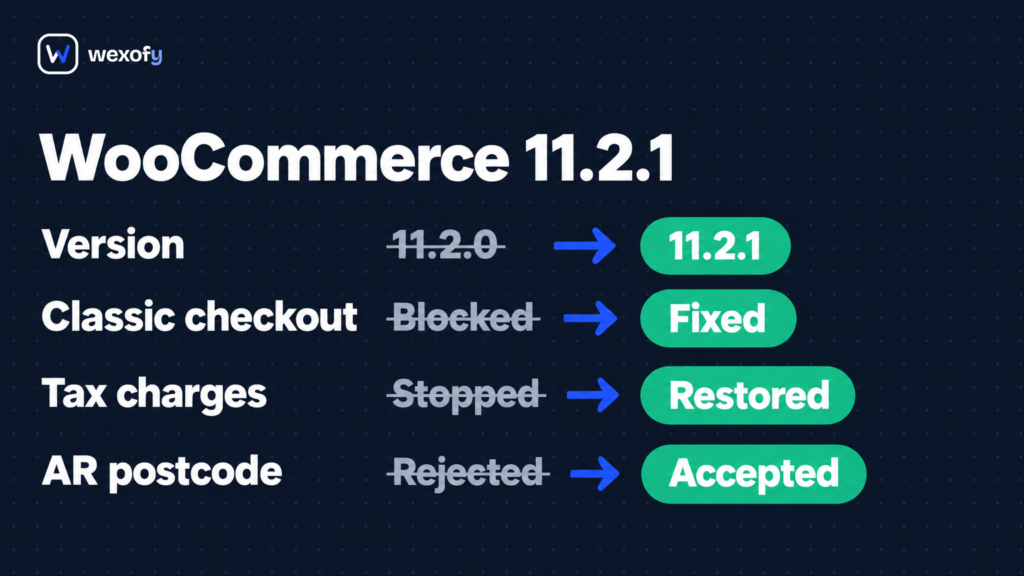
WooCommerce 11.2.1 landed on October 9, 2026, two days after 11.2.0 shipped. The release notes address a regression that can silently break classic checkout on any store that removes billing fields through a PHP filter, meaning customers hit an error, shipping options vanish, or tax stops calculating, with no visible alarm in the WooCommerce admin to flag it. If your store updated to 11.2.0 last week and your checkout form looks simpler than the WooCommerce default, read this before your next order.
What changed in WooCommerce 11.2.1
The release fixes two regressions, both introduced in 11.2.0:
Classic checkout address fields (PR #69644)
WooCommerce 11.2.0 changed how the classic checkout sends address data when the order summary refreshes during the checkout flow. On stores that use the woocommerce_billing_fields or woocommerce_default_address_fields PHP filters to remove fields from the checkout form, the new behaviour broke the data handoff. Three failure modes are possible, depending on how the store is configured:
- The checkout page displayed “Please enter an address to continue.” and refused to let the customer proceed.
- Tax charges stopped calculating.
- Shipping methods stopped appearing.
All three directly block orders. None of them produce a visible error in the WooCommerce admin; you would only catch this through cart abandonment data, a manual checkout test, or a customer complaint. The fix in 11.2.1 restores the 11.1 behaviour for how address data is passed during the order summary refresh. Stores that never use those two filters are not affected.
Postcode validation on the checkout block (PR #69658)
The checkout block in 11.2.0 introduced stricter postcode validation that incorrectly rejected valid formats in several countries. Argentine postcodes without a province letter (for example, 1213) were flagged as invalid even though that numeric-only format has been standard for decades. Postcodes in El Salvador, Saint Vincent and the Grenadines, and the British Virgin Islands were also incorrectly rejected.
11.2.1 corrects the validation logic for those formats. Stores that do not sell to Argentina, El Salvador, Saint Vincent and the Grenadines, or the British Virgin Islands are not affected by this bug.
What 11.2.1 does not include: This is not a security release. It does not require a database update. If you already updated to 11.2.0, the database migration has run; that schema change does not reverse when you move to 11.2.1.
What this means for a WooCommerce store
The classic checkout regression is the one to act on urgently. Checkout pages that block order completion are a direct revenue problem, and this failure condition is easy to miss during routine testing. The bug surfaces during order summary refresh: when a customer changes their country, enters a postcode, or selects a shipping method, the address data sent at that moment is incomplete because the removed fields are absent. A quick manual test that skips those refresh triggers may not catch it.
The woocommerce_billing_fields and woocommerce_default_address_fields filters are in common use. Any time a developer has stripped out a field that is not relevant to the store (phone number on a digital downloads shop, company name on a B2C boutique, address line 2 across the board), one of those filters is in play. Beyond hand-written code in a theme’s functions.php, several checkout customisation plugins apply these filters internally. If your checkout form looks shorter or cleaner than the WooCommerce default, there is a good chance those filters are active somewhere in your codebase.
11.2.0 shipped on October 7. If your store runs classic checkout with removed fields and you updated promptly, there is a two-day window, October 7 to October 9, when some customers could have hit those errors. It is worth pulling up your order history for that period and checking for any drop in completed orders or a spike in abandoned carts.
The postcode issue is more targeted. Argentina is a significant ecommerce market in Latin America, and the standard numeric postcode format (without the letter prefix used in the newer extended format) has been in use for decades. Customers using that format would have found their orders blocked on the checkout block with no obvious explanation. For El Salvador, Saint Vincent and the Grenadines, and the British Virgin Islands, the validation rules were simply too strict.
Rolling back from 11.2.0 to 11.1.x is not a clean option. The 11.2.0 database migration drops the wc_email_unsubscribes table and makes other schema changes. Running the old plugin version against a migrated schema risks compounding the problem. 11.2.1 is the safer path.
We covered everything 11.2.0 changed for stores (the removed agentic checkout APIs, the new GTIN matching in the CSV importer, the account email CC/BCC changes) in our WooCommerce 11.2 breaking changes post. The 11.2.1 release is narrowly scoped to the two bug fixes described above and does not touch any of those other changes.
Checkout customisations built on PHP filters that hook into WooCommerce’s address data pipeline are exposed to regressions at any major release. Monitoring your conversion rate immediately after any WooCommerce update is an easy habit to build. Our post on checkout details that quietly cost conversions covers what to watch.
What to do this week
- Check your current version. In wp-admin, go to Plugins. If WooCommerce shows 11.2.0, update immediately. If you are still on 11.1.x and have not updated yet, update directly to 11.2.1, not 11.2.0.
- Search for filter usage. In your active theme’s functions.php and in any active plugin files, search for woocommerce_billing_fields and woocommerce_default_address_fields. If neither string appears anywhere, your store is not affected by the classic checkout regression.
- Review your October 7-9 orders. If you were on 11.2.0 during that window and you do use those filters, look for failed orders, cart abandonments, or any customer contacts about checkout errors. A drop in completed orders during those two days is worth investigating further.
- Update to 11.2.1. From Plugins, click Update Now next to WooCommerce, or use Dashboard > Updates. No database migration runs with this release.
- Run a checkout test after updating. Place a test order through your full checkout flow and trigger at least one order summary refresh (change country, enter a postcode, switch a shipping method), then confirm the cart updates correctly and the order goes through.
- If you sell to Argentina: Test the checkout block with a numeric-only postcode such as 1213 to confirm it now passes validation. Do the same for El Salvador, Saint Vincent and the Grenadines, and the British Virgin Islands if those markets apply to your store.